Kerberoasting, Explained Step by Step: How the Attack Works and How to Catch It
Any domain user can request a Kerberos service ticket, and some of those tickets can be cracked offline. How Kerberoasting works, why RC4 makes it worse, what it looks like in event 4769, and how to make every ticket worthless.
In our last article we described how real attackers move through a network: a slow, repeating loop of reconnaissance, credential compromise, remote execution and privilege escalation. This time we zoom in on one step of that loop and take it apart: Kerberoasting, one of the most reliable ways to turn an ordinary domain account into a privileged one.
It is worth understanding for one simple reason: in many Active Directory environments it works on day one, with nothing more than a normal user's login. That makes it a favourite of real attackers, and a technique every defender should be able to recognise in their logs.
Kerberos in Plain Words
Kerberos is the authentication protocol at the heart of Active Directory. Instead of sending your password to every server you use, you prove who you are once and receive tickets that you present to services on your behalf. Four terms are enough to follow the attack:
- KDC (Key Distribution Center): the ticket office. In Active Directory, every domain controller runs one.
- TGT (Ticket-Granting Ticket): the ticket you get after logging in. It proves you are an authenticated user, and you use it to ask for other tickets.
- Service ticket (TGS): a ticket for one specific service, such as a SQL Server or a web application. You get it by showing your TGT to the KDC.
- SPN (Service Principal Name): the name a service is registered under, for example
MSSQLSvc/db01.corp.local:1433. The SPN tells the KDC which account runs the service.
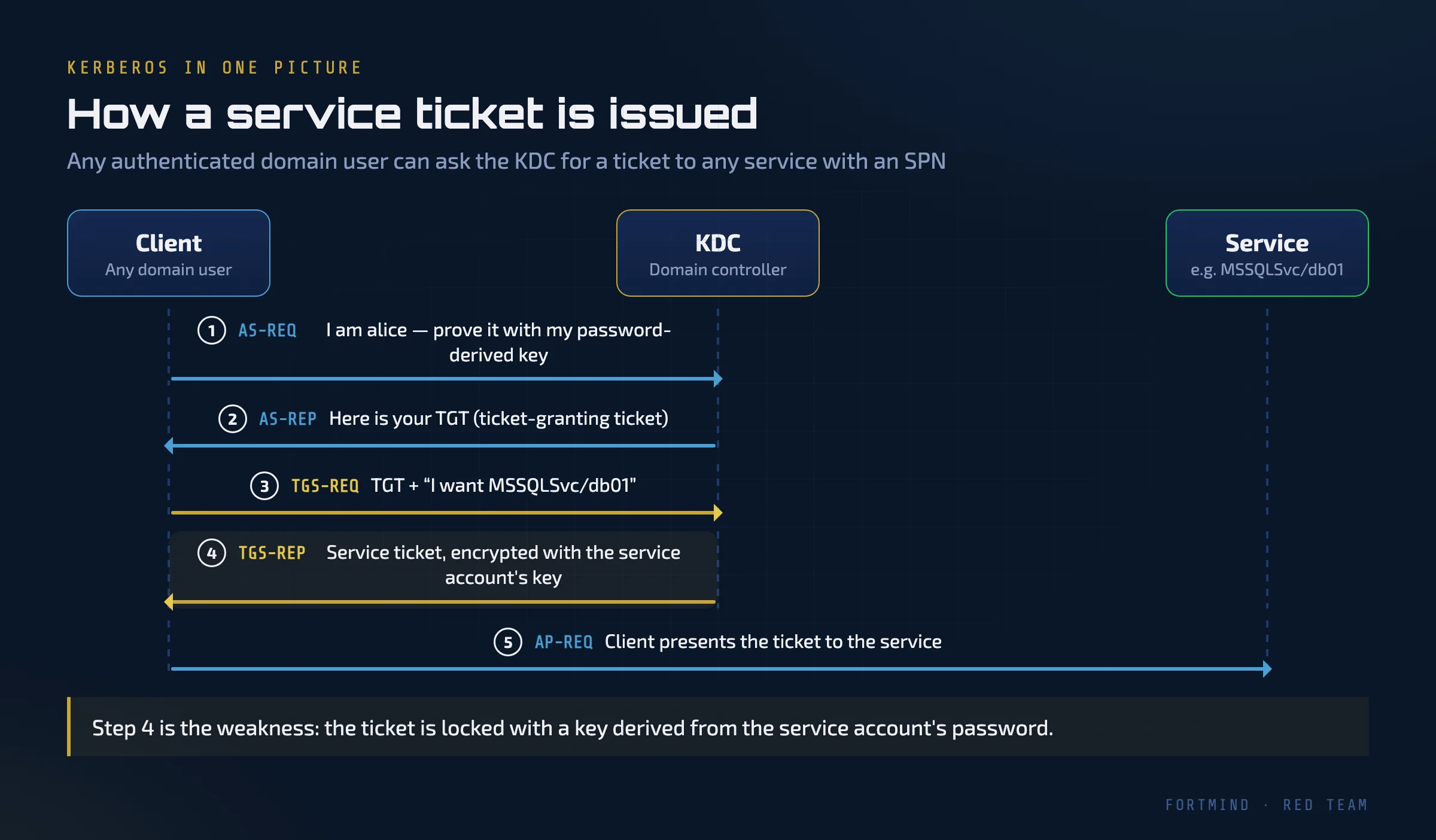
The important detail is in step 4. When the KDC issues a service ticket, it encrypts part of it with the long-term key of the account that runs the service, and that key is derived from the account's password. The service can decrypt the ticket because it knows its own password. Nobody else should be able to.
Why Any User Can Ask for a Ticket
Kerberos is designed so that the KDC does not decide who may use a service; the service does that itself, after it receives the ticket. So the KDC will hand a service ticket for any SPN to any authenticated user who asks. Requesting a ticket is not an attack. It happens thousands of times a day in every domain.
That design choice is reasonable, but it has a consequence. If the service runs under a user account with a human-chosen password, such as svc_sql created years ago by an administrator, then every domain user can obtain a blob of data encrypted with a key derived from that password. And they can take it away and attack it at their leisure.
Computer accounts also have SPNs, but their passwords are long, random and rotated automatically, so attacking them this way is pointless. Kerberoasting targets user accounts that have an SPN.
The Attack, Step by Step
Kerberoasting is catalogued in MITRE ATT&CK as T1558.003 (Steal or Forge Kerberos Tickets: Kerberoasting). It has four steps.
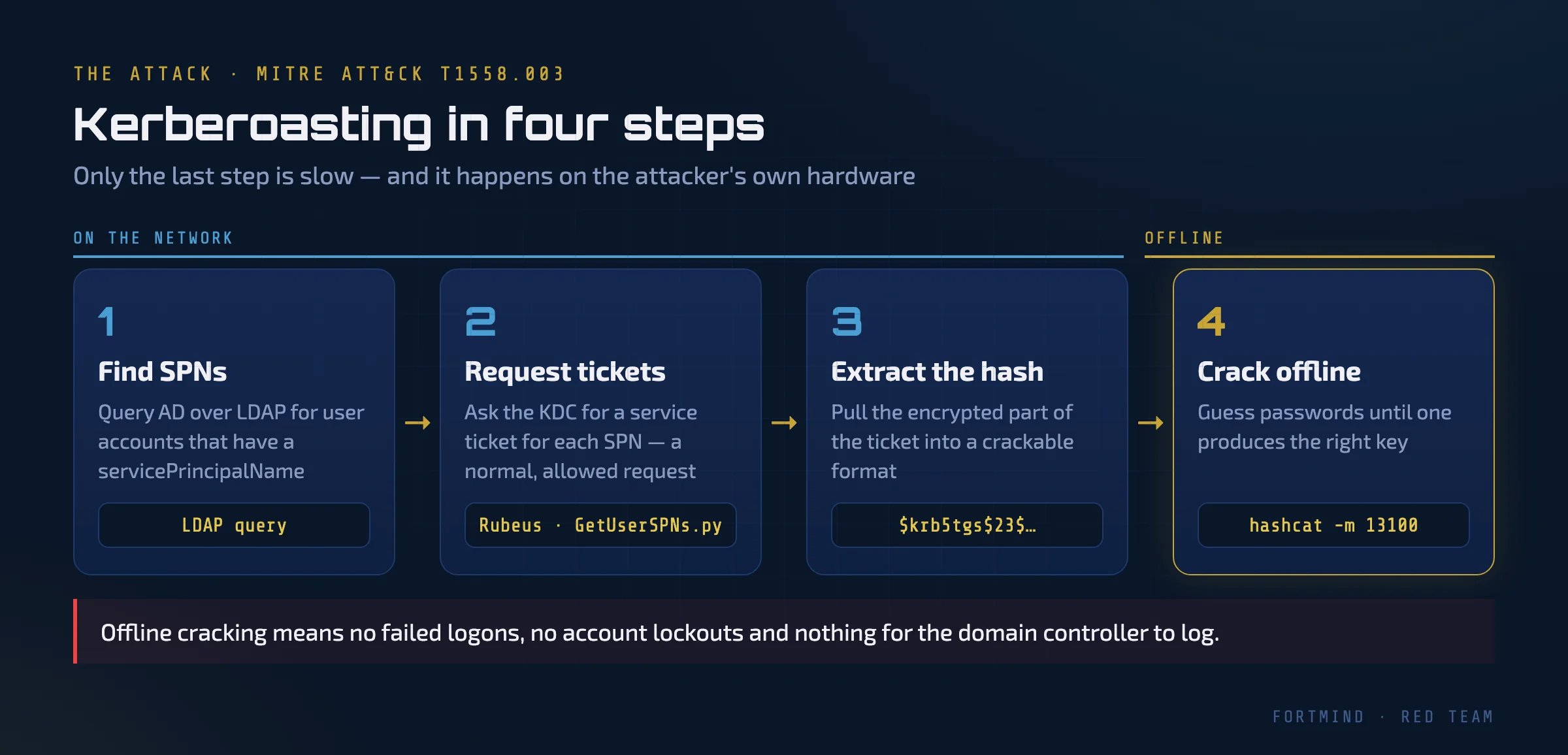
- Find SPNs. The attacker queries Active Directory over LDAP for user accounts that have a
servicePrincipalNameattribute. Any domain user can read this. - Request tickets. For each of those accounts, the attacker asks the KDC for a service ticket. To the domain controller, this looks like a normal request.
- Extract the hash. The encrypted part of each ticket is saved in a format password-cracking tools understand.
- Crack offline. On their own hardware, the attacker guesses passwords, derives the key for each guess, and checks whether it decrypts the ticket. When one does, they have the service account's password.
Public tools automate the first three steps. In an authorized test, a red team operator might run one of these:
# Authorized testing only
Rubeus.exe kerberoast /outfile:hashes.txt
GetUserSPNs.py corp.local/alice -request -outputfile hashes.txt
Rubeus is a C# toolkit for Kerberos abuse that runs on Windows. GetUserSPNs.py is part of the Impacket collection and runs from any machine that can reach a domain controller. The output is then fed to a cracker such as hashcat.
The fourth step is what makes the technique so dangerous. Cracking happens offline: there are no failed logons, no account lockouts and no network traffic for the domain controller to see. The attacker can run billions of guesses for as long as they like.
Service accounts are also attractive targets. They are often members of privileged groups "to make things work", their passwords are rarely changed, and one cracked account can open the path to the high-privilege loop we described in the previous article.
RC4 vs. AES: Why the Encryption Type Matters
How fast those guesses run depends on the encryption type of the ticket.
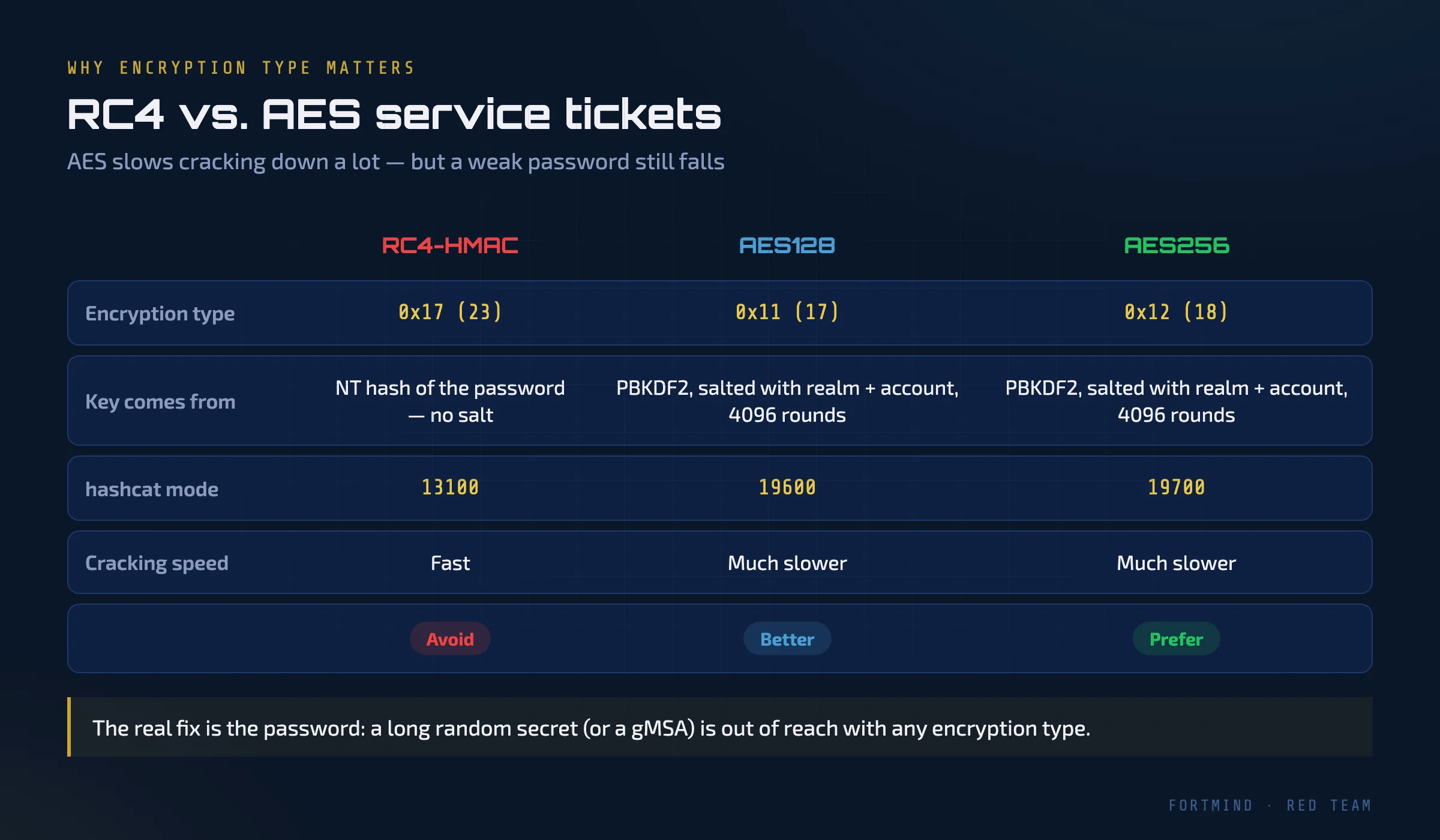
- RC4-HMAC (type 0x17, or 23): the key is simply the NT hash of the password, with no salt. Each guess is very cheap to test. In hashcat this is mode 13100.
- AES128 (0x11) and AES256 (0x12): the key is derived with PBKDF2, using 4096 iterations and a salt built from the realm and account name. Each guess costs far more. In hashcat these are modes 19600 and 19700.
AES therefore slows cracking down dramatically, which is why tickets encrypted with RC4 are so prized. Domain controllers may still issue RC4 tickets for service accounts that are not configured for AES, and attack tools often ask for RC4 on purpose.
But encryption type is not a cure. A short or common password will still fall to an AES ticket; it just takes longer. The real defence is a password that cannot be guessed at all, which we come back to below.
Detection: What Kerberoasting Looks Like in the Logs
Because every step on the network looks like normal Kerberos traffic, detection depends on spotting patterns rather than a single "malicious" event. The key source is the domain controller's Security log.
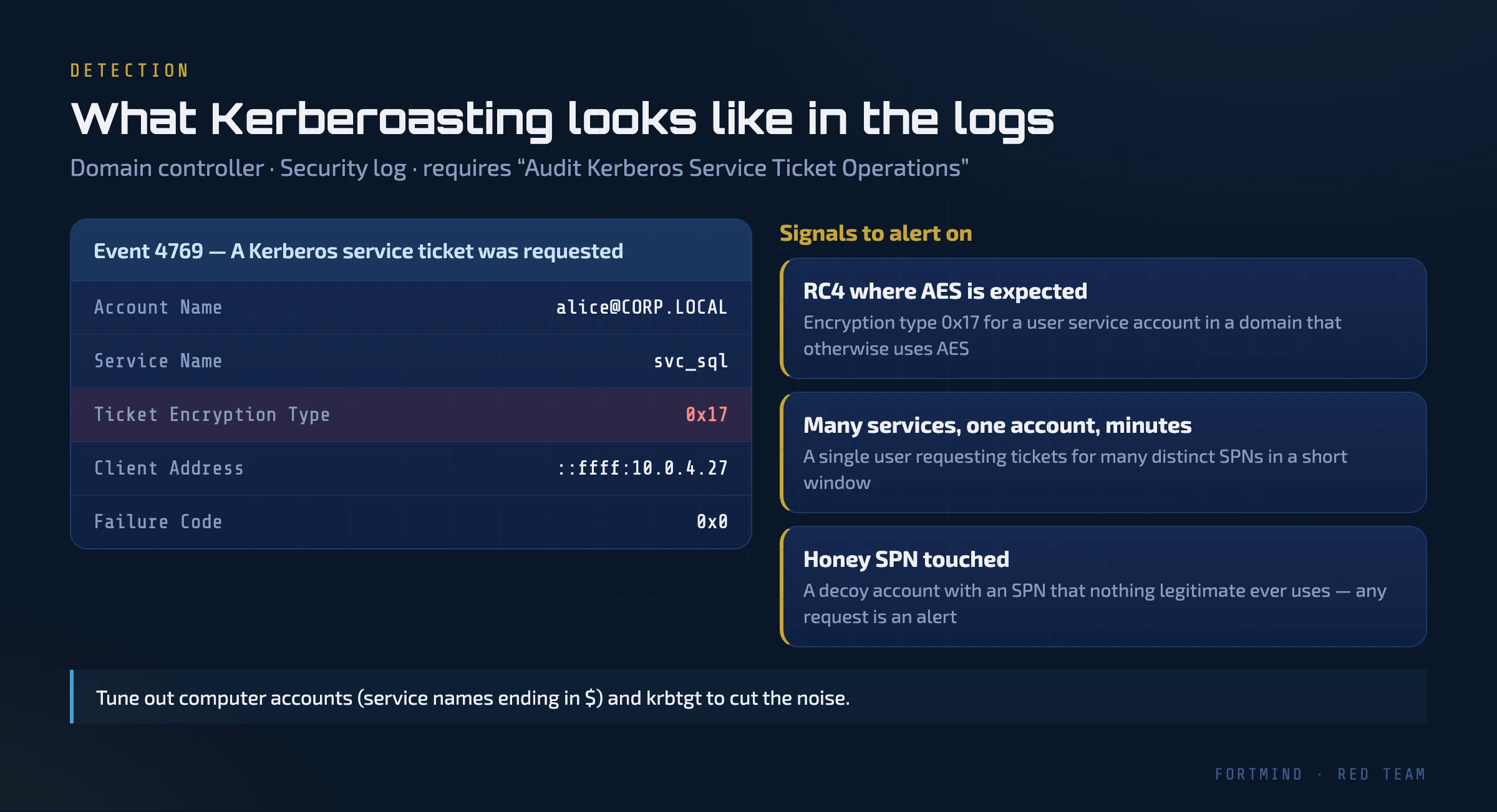
When the audit subcategory "Audit Kerberos Service Ticket Operations" is enabled on domain controllers, every service ticket request produces Event 4769: "A Kerberos service ticket was requested." It records the requesting account, the service name, the client address and, crucially, the ticket encryption type.
Three signals are worth building alerts around:
- RC4 where AES is expected. In a domain where clients and service accounts support AES, a 4769 event with encryption type 0x17 for a user service account stands out. Kerberoasting tools often request RC4 deliberately to make cracking cheaper.
- Many services, one account, a short window. Normal users touch a handful of services. One account requesting tickets for dozens of distinct SPNs within minutes is classic Kerberoasting behaviour.
- A honey SPN is touched. Create a decoy user account with an SPN that no real system uses, give it a very strong password, and alert on any 4769 event for it. Legitimate traffic never requests it, so false positives are close to zero.
To keep the noise down, exclude computer accounts (service names ending in $) and the krbtgt account, and baseline which services each team normally uses.
There is one more variant to watch. An attacker who has write access to another user's account can add an SPN to it and then Kerberoast it, a technique sometimes called targeted Kerberoasting. If directory service change auditing is enabled, changes to the servicePrincipalName attribute appear as Event 5136, and an SPN suddenly added to a regular user account deserves a close look.
Prevention: Make the Ticket Worthless
You cannot switch Kerberoasting off; issuing service tickets is how Kerberos works. What you can do is make sure every ticket an attacker obtains is useless to them.
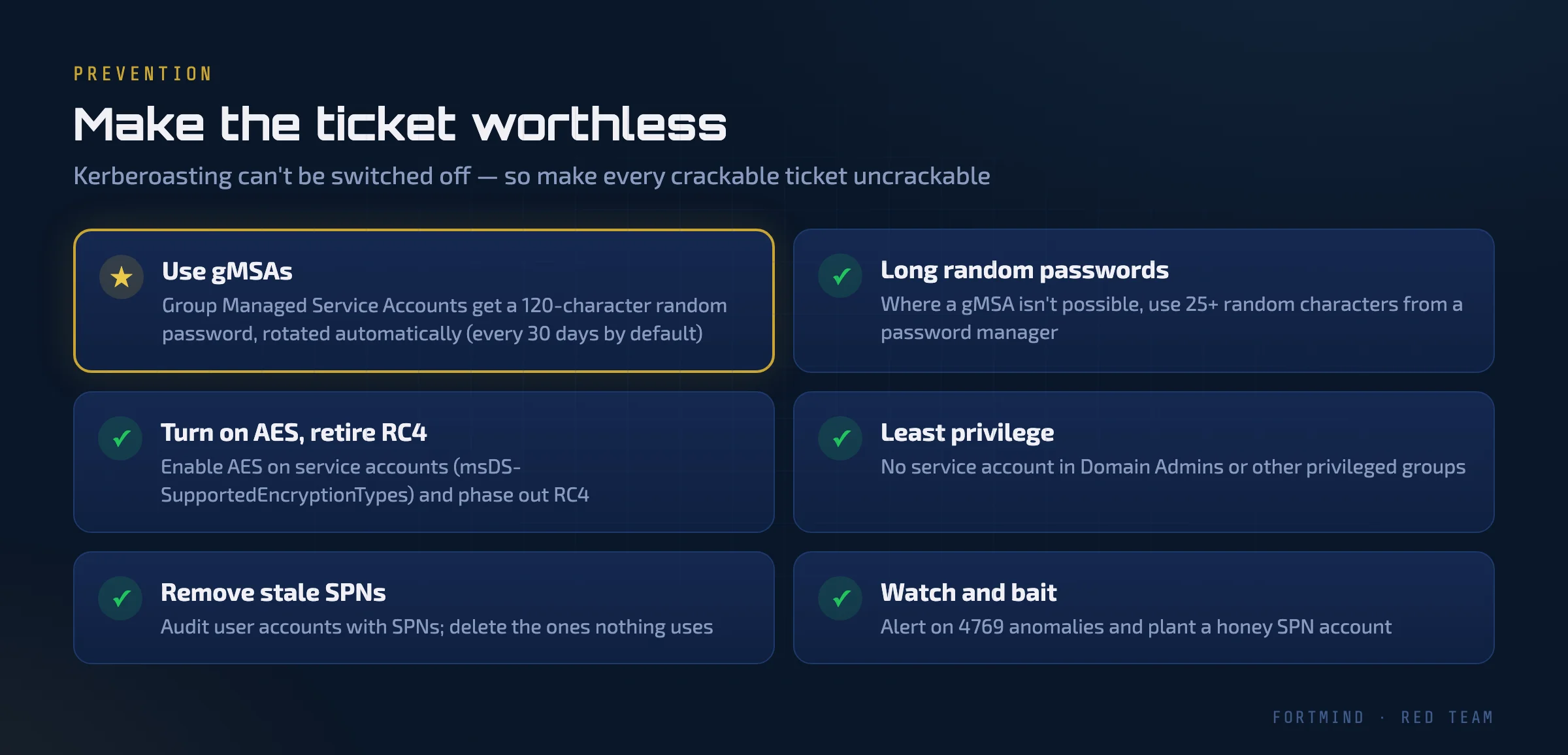
- Use Group Managed Service Accounts (gMSAs). A gMSA receives a 120-character random password that Active Directory rotates automatically, every 30 days by default. Nobody needs to know it, and nobody will crack it. This is the single most effective fix.
- Use long random passwords where a gMSA is not possible. Some legacy applications cannot use gMSAs. Give their service accounts 25 or more random characters generated by a password manager, and rotate them.
- Turn on AES and retire RC4. Configure service accounts to support AES (through the
msDS-SupportedEncryptionTypesattribute) and work towards disabling RC4 in the domain. - Apply least privilege. A service account should have exactly the rights its service needs. It should never be a member of Domain Admins or other highly privileged groups.
- Remove SPNs nobody uses. Audit user accounts that have SPNs. Old entries for retired applications are pure attack surface.
- Watch and bait. Enable 4769 auditing, alert on the patterns above, and plant a honey SPN account.
Practising This Safely
Kerberoasting is a technique to understand from both sides: how it is done, and how it is caught. The principle from our previous article still applies, primum non nocere, "first, do no harm". These steps belong only in environments you own or are explicitly authorized to test, under agreed Rules of Engagement.
That is exactly why we build isolated practice ranges. In FortMind's FM-O300 Active Directory red-team course, you perform Kerberoasting against a purpose-built lab domain, then switch seats and hunt for the same activity in the logs. You see the attack and its fingerprints, in your browser, without touching anyone's production network.
Take a moment to check your own domain: which user accounts have SPNs, how old are their passwords, and would your SOC notice if someone requested tickets for all of them this afternoon?